






AI that talks to your customers
Illustration
A unified agent desktop: one screen for every customer conversation
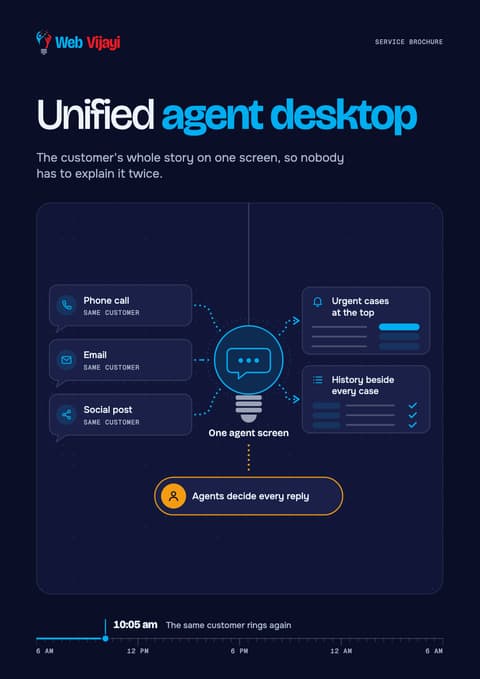
One agent screen for calls, email, chat, messaging apps and social, with each customer's CRM history and AI that raises urgent cases for a person.
A free call, then a fixed quote in writing. You don't have to go ahead.

The short answer
A unified agent desktop brings a customer's phone calls, emails, chats and social messages together on one screen, beside their CRM record, so whoever picks up can carry on without asking the customer to repeat themselves. Web Vijayi sets these up for service teams that handle a lot of contacts across several channels, and AI sorts the queue by rules you set.
When a customer gets in touch, your agent needs the whole story at once. This AI-assisted CRM shows that customer's orders, past tickets and notes beside the conversation, so the agent who picks up can see what happened yesterday. During the conversation the software suggests answers from your approved policies, and your agents decide what to say. We connect the systems, move the records across and set up the help, with a person in charge at every step.
Key facts
Your data
Who is it for?
Medium and large businesses whose service teams handle a lot of contacts across several channels. A customer emails on Monday, rings on Tuesday and complains on social media on Wednesday, and each time a different agent starts from nothing, because the email sits in the helpdesk, the call notes in the CRM and the post in a social tool that only marketing opens.
It suits you if any of this sounds familiar:
Agents keep several systems open and copy details between them while the customer waits.
Urgent cases, such as a customer about to leave or a complaint going public, wait in the same line as password resets.
New agents take a long time to learn the policies, so experienced staff spend their day answering colleagues.
Your managers can't see what customers contact you about without asking each team for a spreadsheet.
If you only need your CRM linked to other business systems, or a new sales CRM chosen and set up, see API integration. If you'd like a team of people to answer your customers for you, see customer support outsourcing.
What does the service cover?
AI-native CRM: one screen for every channel
This is the agent screen itself. Calls, emails, web chat, messaging apps and social messages arrive in one queue, and each opens beside the customer's full record, so the agent sees the open order, the last few contacts and the promise someone made on the phone last week. "AI-native" means the sorting and suggestions are built into that screen from the start, working from the same record the agent sees, rather than living in a separate tool.
The queue doesn't run first come, first served. You write the rules for what counts as urgent: a cancellation, a safety complaint, a public post that is drawing replies, a customer you've marked as a key account. The software moves those cases to the top of the queue and sends each one to the team you chose for it.
CRM Integration: connecting the systems and moving the records
We connect the CRM to the systems that hold the answers customers ask for, such as orders, billing, delivery, the phone system and your social accounts, so that what the agent sees is current.
Moving old records gets a plan of its own. Before anything moves, your teams agree what each field means, because sales and service often use the same word for different things. One person on your side, usually called the data steward, has the final say on those definitions. We remove duplicates, map old fields to new ones and run trial migrations, and your staff check samples of the result before the real move.
AI-Assist: live help for the agent on the call
While the customer talks or types, a live transcript appears on the agent's screen, and the software suggests an answer and the next step your procedure calls for. Each suggestion links to the policy or article it came from, so the agent can check it before using it. The agent can also ask for help when a question is unusual. After the conversation, it drafts a short summary for the agent to check and correct before it's saved to the record.
Team leads see which questions agents needed help with. That list shows where your policies are unclear or missing, so you know which ones to rewrite. For an assistant that answers staff questions from your documents outside live calls, see ask your documents.
What should you settle before switching on live help?
Live help listens to calls and reads chats, so three questions need answers before it goes live.
How are card payments taken?
The card industry's security council says a card security code can't be stored once a payment has gone through, even if it's encrypted, and any recording that captured it must have it deleted. A transcript is a recording in text, so the same rule applies to it. Pausing the recording doesn't take the agent's own screen out of scope either. So we agree with you how payments are handled, for example by sending the customer a secure payment link, before transcription is switched on.
Have your agents been told?
A dashboard that shows what each agent asked for help with is monitoring of staff. In the UK, the ICO says employers must have a lawful basis, choose the least intrusive approach, tell workers before monitoring starts and assess the risk first, and it advises asking staff for their views. Your agents should hear about it from you, in plain words, before the first call.
Will anything try to read emotions?
Since 2 February 2025 the EU AI Act has banned AI that infers the emotions of people at work, apart from medical or safety uses, and the European Commission's guidance counts voice as the kind of data the ban covers. Some agent-assist tools offer a "sentiment" score from the call audio. For teams covered by the Act, we leave voice-based emotion scoring of agents switched off. We're not your lawyers, so your legal team gives the final view on what's allowed where you operate.
How does it work?
- We map how a contact moves today. Which channels customers use, which systems hold their history, what agents retype, and which contacts are urgent.
- We write the rules with you. Field definitions, what counts as urgent, where each type of contact goes, which documents the suggestions may draw on and what they must never promise. You sign them off before anything is built.
- We connect the systems and move the data. Integrations first, then trial migrations, with your staff checking samples of the moved records.
- Your agents test it. They run real scenarios on the new screen, we rehearse the switch-over, and your side signs off before go-live. Signing off means your side agrees it's safe to run your service on.
- We start with one team. A single queue or team goes first, so you can compare it with the old way before everyone moves across.
- We run it, report and adjust. Each month we review the suggestions, the questions nobody could answer and any contacts that went to the wrong team, and we change the rules when your products or policies change.
What you get
Screens are mock-ups
One agent screen with calls, chats, emails and social messages beside each customer's history
A queue that raises urgent cases by rules you set
Your CRM connected to the order, billing, phone and social systems your agents need
Customer records cleaned, de-duplicated and moved across, with sample checks your staff sign off
Suggested answers during calls and chats, each linked to the approved policy it came from
A draft summary after each conversation, which the agent checks before it's saved
A list of the questions agents needed help with, so you can fix gaps in your policies
Test results and a go-live checklist signed by your side
Guides and training for agents, team leads and the people who run the system
You stay in control
Everything we set up works with a person in charge. It can prepare the work and wait for your yes before anything goes out, it passes anything unusual to you or your team, and it keeps a record of what it did. You can check it, change it, pause it or switch it off whenever you like.
On this service that means:
Your agents decide what to say. Nothing the software suggests reaches a customer unless the agent says it or sends it, and no summary is saved until the agent has checked it.
You write the rules for the queue, and your team leads can change them. If you let the software send some contacts straight to a team, you decide which ones it may route without asking, the record shows each time it did, and you can stop it at any time. If you'd rather a person approved each step, we set it up that way.
Suggestions come only from the documents you approve, and each one shows its source.
You can switch off each feature, from queue sorting to live suggestions, on its own.
You have one named contact on our side and a monthly review, and the contract states how the service is changed, paused or ended.
COPC's performance standard for customer operations, updated in February 2026, now holds AI-assisted contacts to the same checks as live agents. We review the suggestions every month, and if one was wrong, we trace it back to the rule or document behind it and agree the fix with you.
What do we need from you?
A list of the channels, systems and tools your service team uses today, and access to each for the build
The policies, procedures and help articles the suggestions may draw on, and someone who can say which version is current
A data steward who decides what each field means and signs off the migrated samples
A few agents and a team lead to test the new screen on real scenarios
Your rules on personal data, payments and call recording, and the countries you serve
One person who signs off the rules and comes to the monthly review
Where it fits
A natural next step is analytics and insights, which looks across every conversation for patterns and quality issues. If you'd like people to staff the screen as well, see chat and email support or customer support outsourcing. For AI that answers customers directly, with your staff taking over when needed, see AI voice agents and AI chatbots.
Price
We quote every project in writing after a free consultation, with the timeline agreed in the same quote. The price depends on how many channels and systems are involved, how much data has to move and how many agents will use it. CRM, phone and AI licences are paid separately. The pricing page explains how our quotes work.
Download the brochure
Unified agent desktop
Four A4 pages on how it works, what you get, what we'll need from you and the questions people ask, ready to pass round your team.
Sources
- PCI Security Standards Council, Protecting Telephone-Based Payment Card Data (information supplement, sections 5.2.6 and 6.5.1)2026-11-21
- EU AI Act, Article 5: prohibited AI practices (AI Act Service Desk)2026-11-21
- EU AI Act, Article 113: entry into force and application2026-11-21
- Future of Privacy Forum, the emotion recognition ban in the workplace (24 March 2026)2026-11-21
- ICO, Monitoring workers: data protection and monitoring workers2026-11-21
- ICO, What needs to be included in a controller and processor contract2026-11-21
- COPC, CX Standard Release 8.0 (11 February 2026)2026-11-21
- destinationCRM, reporting Gartner's 2026 customer service survey2026-11-21
- CX Today, real-time AI guidance with human oversight (22 June 2026)2026-11-21
- Microsoft Learn, Dynamics 365 implementation guide: data management, testing and go-live2026-11-21
- Microsoft Learn, Dynamics 365: overview of unified routing (updated 15 April 2026)2026-11-21
- Microsoft Learn, Dynamics 365 Contact Center: enable Copilot case and conversation summaries (updated 31 August 2026)2026-11-21
- Microsoft HAX Toolkit, guideline 9 example: Dynamics 365 Customer Service chat summary2026-11-21
FAQ
What is a unified agent desktop?
It's one screen where agents handle every channel, with the customer's history beside the conversation, in place of separate tabs for phone, email, chat and the CRM. When the software that sorts the queue and suggests answers is built into that screen from the start, working from the same record the agent sees, it's often called an AI-native CRM.
Is it the same as a CRM, and do we have to replace ours?
A CRM stores customer records. The agent desktop is the screen agents work in, and it reads from and writes to the CRM. So you don't always need a new one. Often the quicker route is to connect the CRM or helpdesk you already pay for to your order, billing, phone and social systems and build the agent screen on top. If your current system can't do what your agents need, we tell you so before anything is moved.
Will the software talk to our customers?
No. On this service it works for your agents. It sorts the queue by your rules, suggests an answer and the next step, and drafts a summary after each conversation. The agent decides what to say. Nothing it suggests reaches a customer unless the agent says it or sends it. If you also want AI that answers customers directly, that is our chatbot and voice agent work.
Will it work with our phone system?
Most agent desktops connect to phone systems through standard integrations or APIs, so the customer's record can open on screen as a call comes in. Older on-premise phone systems may need extra work, and we look at yours when we map how contacts move today.
How is customer data protected, including card details said on a call?
Access should follow job roles, and every view and change should be logged. Call recordings and transcripts hold personal data, so it's worth setting retention rules before launch. Card security codes have a stricter rule: the card industry says they can't be kept after the payment goes through, even encrypted, and that applies to transcripts as well as recordings. So we plan with you how payments are taken before transcription is switched on, so card details stay out of the transcript and out of every suggestion and summary built from it.
Is it legal to analyse our agents' calls?
It can be, with care. In the UK, the ICO expects employers to have a lawful basis, tell staff before monitoring starts and assess the risk first. In the EU, AI that reads the emotions of people at work has been banned since February 2025, and that includes reading them from their voice. We set the system up to fit the laws you name, and your legal team gives the final view.



Next step
Tell us how many systems your agents switch between on a typical call, and we'll show you where one screen would save the most time. If you can, bring a recent case where a customer had to repeat themselves.
Book a free consultationLast updated