






Support and back-office teams
Illustration
Technical support outsourcing: a helpdesk your customers can reach
Technical support outsourcing gives your customers a trained outside team to answer their technical questions.
A free call, then a fixed quote in writing. You don't have to go ahead.

The short answer
Each problem becomes a ticket, and the team fixes what it can and passes the rest to your engineers or specialists, working to response targets agreed in advance. Web Vijayi runs it for companies whose support has outgrown the people doing it, and can add IT support for your staff.
Key facts
Who is it for?
It's for medium and large businesses whose support has outgrown the people doing it. Usually it shows up as product engineers losing afternoons to customer tickets, a small IT team looking after hundreds of laptops, cover that ends when the office closes while customers and branches keep working, or a busy season that floods the queue every year.
It also suits companies that already run a helpdesk and want the first line taken off their hands, so their own specialists can spend their time on the hard problems.
Technical support services for your customers
When a customer can't log in, an integration fails or a feature behaves oddly, they reach our team on the channels you choose. The first line works through your troubleshooting guides and fixes the common problems on the spot. Before anything goes to an engineer, the team collects what the engineer will ask for: version, steps to repeat it, screenshots and error messages.
Bugs reach your developers as clear reports in your issue tracker, so they spend their time fixing rather than chasing details. Customers get updates as their ticket moves.
IT support for your own staff
For your employees, the helpdesk handles everyday breakages: locked accounts, new starters and leavers, laptops and phones, email, VPN, printers and the business apps they use. Fixes are done remotely through tools you approve.
Anything that needs a specialist, such as a network fault or a server problem, goes to your IT team or your suppliers with the diagnosis already done. Where it's agreed in your quote, the team can also watch alerts from your systems and devices and open a ticket before anyone has to call.
What do level 1, 2 and 3 mean?
Most helpdesks split work into levels. Level 1 is the first line: generalists who answer, log and fix the common problems. Level 2 is a smaller group of more senior people who take what level 1 can't solve. Level 3 is the specialists, usually your own engineers, product team or software vendors. Self-help articles are sometimes called level 0.
What you have to decide is where the lines sit. Before we start, we agree which problems the first line may fix, which go up, and to whom. Escalations that arrive half-explained tend to bounce back and forth, so every ticket we pass on says what was tried and what was found.
How it works
We look at your support today.
We go through a sample of recent tickets, the problems that come up most, the systems involved and who handles what. From that we agree the scope, channels, hours and the levels we cover.
We agree priorities and targets.
A ticket's priority comes from two things: how much of the business it affects, and how quickly the damage grows. We agree what counts as urgent for you, the response and fix targets for each priority, and what happens when a major outage hits.
We write the playbook with you.
It holds troubleshooting guides, escalation routes, approved replies and the checks the team must make before resetting a password or changing someone's login. You approve it before anything goes live.
We set up access safely.
The team gets its own named accounts with only the access the work needs, multi-factor login and recorded remote sessions, inside your ticketing system or one we agree.
We go live in stages.
Usually one product, region or department comes first, with frequent check-ins, and the rest follows once you're happy.
We keep improving it.
We look for problems that keep coming back, write or update the help articles that would prevent them, and report what changed.
What you get
Screens are mock-ups
A staffed helpdesk for your customers, your staff or both, on the channels and hours agreed in your quote
Every request logged as a ticket with its priority, history and outcome
Escalations to your engineers or suppliers with the steps tried and the evidence attached
A playbook of troubleshooting guides and escalation routes, written with you and kept up to date
Help articles written from real tickets, so common questions get answered without a call
Identity checks before any password or login reset, to rules you set
A regular report on ticket volumes, response and fix times against target, repeat problems and open risks
A named service contact who knows your account
How do you stay in charge of the work?
Agreed scripts and rules.
The team follows the playbook you approved. Any change to what they may fix, say or reset needs your yes first.
Everything on record.
Each ticket shows who handled it, what they did and when. Access and remote sessions are logged, and you can read any of it whenever you like.
Regular reports.
You see targets met and missed, recurring problems and anything waiting on a decision from you, with a review meeting to go through it.
A named contact.
One person on our side owns your account and is your first call for a complaint, a change or an urgent problem.
Change it or stop it.
You can change the scope, hours or rules, or end the service, on the notice set in your contract. Where your contract allows, you can also pause part of it. When it ends, your tickets, the playbook and the help articles stay yours, our access is removed, and any copies of your data we hold are returned or deleted, as the contract sets out.
What should you check on security?
A helpdesk can reset passwords and reach your systems remotely, which makes it a target. Criminal groups have phoned helpdesks pretending to be employees and talked staff into resetting passwords or moving multi-factor login to a phone the attacker controls. Government security agencies in the US and New Zealand have both warned about it.
The defences are plain ones. Write down what a caller must prove before any reset and what happens when they can't, train the team on it regularly, and use multi-factor login that a phone call alone can't move. For the helpdesk's own access, ask for named accounts with the least access needed, logged sessions, approved remote tools only, and access removed as soon as it isn't needed.
In the contract, check how fast incidents are reported to you, where your data is handled, who else may work on it, and what happens to it when the contract ends. We agree all of this in writing before the team starts.
What do we need from you?
A sample of recent tickets, or a list of the problems people raise most
Your current guides, known fixes and product documentation
Access to your ticketing system, and a test account for each tool the team supports
Who to escalate to at each level, and when they're available
Your rules for identity checks, data handling and anything the team must never do
One person on your side who can approve the playbook and any changes
What else can work alongside the helpdesk?
Some of the load can go to tools, with the team always behind them. A chatbot for common questions can answer the simple ones and hand anything else to the helpdesk, and out-of-hours call answering can take calls while the team is offline and pass anything unusual to a person. A knowledge base for agents lets the team look up answers in your own manuals and policies. If new customers also have questions before they buy, a pre-sales team can take those, so the helpdesk stays on support.
Price
We quote in writing after a free consultation, and we agree the timeline in the same quote. The price depends on how many people the helpdesk serves, how many tickets come in, the hours and channels covered, and which support levels we take on. You'll find full details on the pricing page.
- Paid separately
- Ticketing and remote support tool licences, if any
Download the brochure
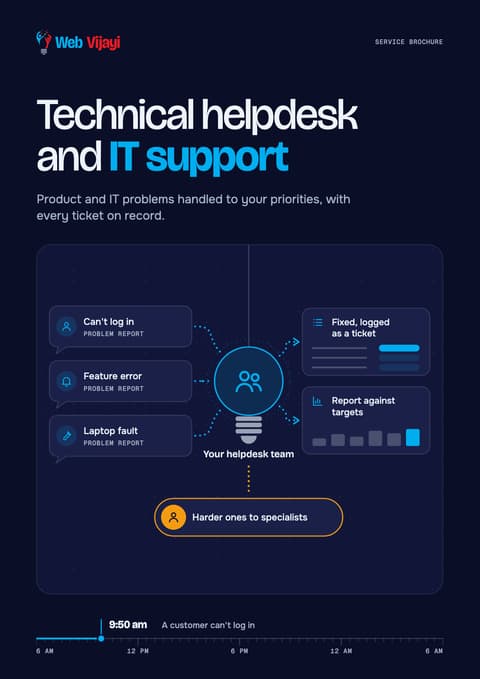
Technical helpdesk and IT support
Four A4 pages on how it works, what you get, what we'll need from you and the questions people ask, ready to pass round your team.
Sources
- CISA and partners, joint advisory AA23-320A on Scattered Spider2025-07-29
- NCSC New Zealand, 'Attack on the helpdesk', Quarter Two Cyber Security Insights 2025
- UK NCSC, Supplier assurance questions
- UK NCSC, Supply chain security, principles II: establish control2025-10-22
- ICO, What needs to be included in the contract (controllers and processors)
- HDI, 'Tiered support explained'
- ITIL process wiki, Checklist: incident priority
FAQ
What is technical support outsourcing?
It means an outside team handles your customers' technical questions for you: they can't log in, an integration fails, a feature misbehaves. The team usually works inside your own ticketing system, to response and fix targets set in the contract. IT support is the help your own staff get with laptops, accounts, email and business apps. If you need both, the same helpdesk can run them as two queues with their own rules.
What should a technical support SLA include?
A service level agreement should set out the priority levels, the response and fix targets for each, the hours covered, and what happens when a target is missed. We agree the targets for each priority before we start, and every report shows how they were met. Priority depends on how much of the business a problem affects and how fast it gets worse, so a payroll system that's down comes before one slow laptop.
How do you stop someone tricking the helpdesk into resetting a password?
With rules agreed before we start. You decide what a caller must prove before any password or multi-factor login reset, and what happens when they can't prove it. The team is trained on those rules and every reset is recorded. Government security agencies have warned that criminals phone helpdesks pretending to be staff, so this is part of every setup.
How does an outside team learn our product?
From your guides, product documentation and a test account for each tool the team supports. We turn them into a playbook of troubleshooting steps and escalation routes, and you approve it before anything goes live. The team works inside your own ticketing system where you have one, so your ticket history stays in one place and stays yours, and going live in stages shows up any gaps early.
Will our developers still hear about bugs?
Yes. Bugs reach your developers as clear reports in your issue tracker, with the version, the steps to repeat the problem, screenshots and error messages already collected. We also look for problems that keep coming back and report them, so you can see what keeps breaking.
How is technical support outsourcing priced?
Providers commonly charge a monthly fee per agent, a price per ticket or an hourly rate. We quote in writing after a free consultation, and the price depends on how many people the helpdesk serves, how many tickets come in, the hours and channels covered, and which support levels we take on.
Related
- Customer support outsourcingCustomer support outsourcing for phone, chat and email, run to your rules
- Chat and email supportEmail, chat and ticket support teams that work to your rules
- Phone support teamsPhone support outsourcing: a trained team for your customers' calls
- CybersecurityCybersecurity as a service, without an in-house security team
- Security and maintenanceWebsite maintenance and security services
- Analytics and insightsQuality assurance on every call, chat and email

Pictures are illustrations






Next step
Book a free consultation and bring a few recent tickets. We'll show you which of them a first line could fix, and what would need to go up.
Book a free consultationLast updated