






AI for selling, learning and planning
Illustration
A sales follow-up assistant that keeps every deal moving
Sales mail filed in your CRM, replies drafted for approval, quiet deals listed and missing company details filled in. You stay in control.
A free call, then a fixed quote in writing. You don't have to go ahead.

The short answer
Replies go out late, quiet deals sit untouched and the CRM falls behind because updating it takes typing nobody has time for. Sales teams in busy companies feel this most when enquiries and open deals arrive faster than anyone can follow up on time. This service sets up a follow-up helper that works inside the CRM you already use, files the mail, drafts the next reply and flags what has gone quiet, with a person in charge throughout.
Key facts
Who is it for?
Sales teams in medium and large companies that sell to other businesses. It suits teams that already use a CRM and get more enquiries and open deals than they can follow up on time. It works inside the CRM you already use, such as HubSpot or Salesforce. It is not for a business run by a single person. Your team stays close to the buyer while the assistant takes care of the typing and the filing.
What does the assistant do?
Keeps the record
It reads only the sales mailboxes you connect, and only sales conversations in them. Personal and internal mail is left alone. Each conversation is filed against the right contact, company and deal in your CRM, and the stage and the next step are updated, so the record shows where each deal stands.
Drafts the next reply
It drafts the next reply in your team's tone, from the conversation so far and your own approved material. The salesperson reads the draft, changes it if needed, and sends it. Nothing goes to a customer without a person's yes, unless you choose to let named routine messages, for example a meeting confirmation, go by themselves. The salesperson has the final word on every draft.
Reminds you about quiet deals
It lists deals that have gone quiet and suggests the next step for each one. You see the list and decide what to do next. The list is drawn from the mail and the CRM record.
Fills in missing company details
It fills in missing company details from your own records and from public sources. It marks where each detail came from, so a person can check it. You keep what is right and drop what is not. The detail sits in the CRM beside the contact and the deal it belongs to.

Replies go out late, quiet deals sit untouched and the CRM falls behind.
Sales teams in medium and large companies

A follow-up helper that works inside the CRM you already use
- Files each conversation against the right contact, company and deal
- Updates the stage and the next step
- Drafts the next reply in your team's tone
- Lists deals that have gone quiet

The salesperson
reads the draft, changes it if needed, and sends it
Nothing goes to a customer without a person's yes, unless you choose otherwise for named routine messages
what you get
- A record that shows where each deal stands
- The next reply drafted, ready for approval
- Quiet deals with a suggested next step
You stay in control
- Anything unusual goes straight to a named person and is never answered by a draft alone
- You can check every draft and every record change
- Pause it, or switch it off at any time
webvijayi.com
What does it never do?
It never buys or uses bought contact lists. It never sends cold bulk mail. It never contacts anyone who has not written to you or agreed to hear from you. Complaints, price or contract questions, legal points and angry messages go straight to a named person.
The CRM you already use
 Sales conversations
- Contacts
- Companies
- Deals
Only the sales mailboxes you connect
The assistant
A record of what was done, open for your team to check
The salesperson
has the final word on every draft
A named person
sees unusual messages first
Personal and internal mailBought contact listsCold bulk mail
webvijayi.com
How does it work?
We map your sales stages and tone.
We write down how deals are organised today, what each stage means and how your team writes.
We connect the mailboxes and CRM you choose.
Only the sales mailboxes you name.
We run it in draft-only mode beside your team.
A person on our side checks the work during the first weeks, and your salespeople approve each draft and each record change.
We review weekly and adjust.
You get a short weekly summary of what was filed, what was drafted, what was sent and what was passed to a person, and we adjust the setup with you.
What you get
Screens are mock-ups
Sales mail filed against the right contact, company and deal
The stage and the next step kept up to date in your CRM
The next reply drafted in your team's tone, ready for approval
A list of quiet deals with a suggested next step for each
Missing company details filled in, with the source marked for checking
A short weekly summary of what was filed, drafted, sent and passed to a person
A named person for unusual messages, who sees them first
A record of what was done, open for your team to check
You stay in control
Everything we set up works with a person in charge. It can prepare the work and wait for your yes before anything goes out, it passes anything unusual to you or your team, and it keeps a record of what it did. You can check it, change it, pause it or switch it off whenever you like.
On this service that means:
You approve each draft before it goes out
If you let named routine messages go by themselves, you decide what it may do without asking, it tells you each time it acts, and you can stop it at any time
After the first weeks, you choose which record changes it may make without asking. Each one is recorded, and you can switch back to approving them at any time
Anything unusual goes straight to a named person and is never answered by a draft alone
You can check every draft and every record change, pause it, or switch it off at any time
It keeps a record of what it did, and a person on our side checks the work during the first weeks
Your records stay in your own CRM and stay yours
What do we need from you?
Access to the sales mailboxes and the CRM you choose
Your sales stages, and examples of how your team writes
Your approved material for replies
The contact, company and deal rules you use today
A named person for unusual messages
One person who approves the setup and reads the weekly summary
Time with your sales lead in the first weeks to check the work
Where it fits
If you would rather have people handle the follow-up for you, see sales support teams, who reply, qualify and hand sales-ready leads to your closers. For follow-up mail that goes out on its own once you approve the workflow, see marketing automation. For wider work across mail, chat and sheets that runs with checkpoints, see AI agents and automation. To connect the CRM with orders, billing and other tools, see API integration.
See how it works
A follow-up helper that works inside your CRM. It files sales mail, drafts replies and lists quiet deals.
Price
We quote every setup in writing after a free consultation, with the timeline agreed in the same quote. You will find how quotes work on the pricing page.
Download the brochure
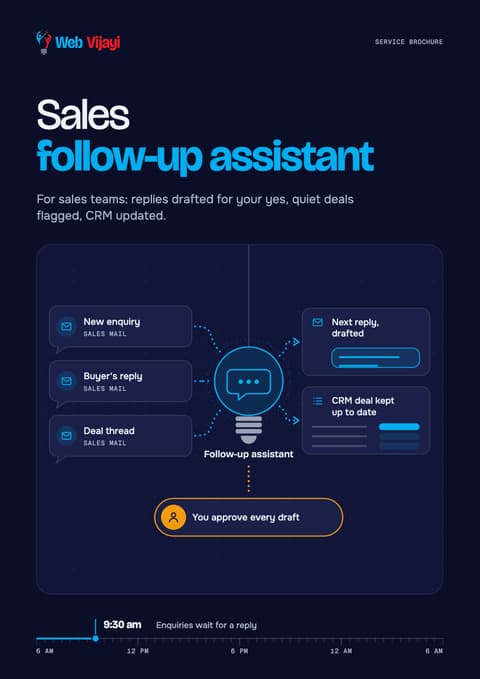
Sales follow-up assistant
Four A4 pages on how it works, what you get, what we'll need from you and the questions people ask, ready to pass round your team.
FAQ
What mail does the assistant read?
Only the sales mailboxes you connect, and only sales conversations in them. Personal and internal mail is left alone.
Does it send mail to customers on its own?
No, unless you choose otherwise for named routine messages. It drafts the next reply and a salesperson reads it, changes it if needed, and sends it.
How does our CRM stay up to date?
It files each sales conversation against the right contact, company and deal in the CRM you already use, and updates the stage and the next step. Your records stay yours.
What happens with a complaint or a tricky message?
Anything unusual, such as a complaint, a price or contract question, a legal point or an angry message, goes straight to a named person. It is never answered by a draft alone.
How much does it cost?
Every setup is quoted in writing after a free consultation, so there is no list price.
Next step
Tell us where follow-up slips today, late replies, quiet deals or a CRM that falls behind, and we will map where an assistant would help first. If you can, bring a recent week of enquiries and open deals.
Book a free consultationLast updated